Slim Profile Picture Light: Sleek Workspace Decor Idea

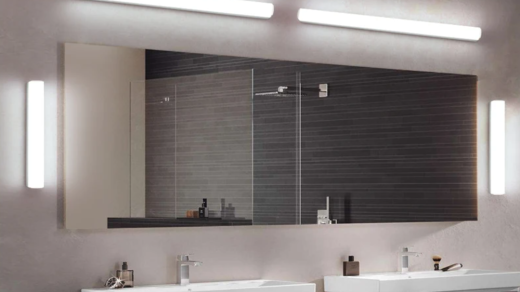
A slim profile picture light is essentially a specialized lighting fixture designed to illuminate artwork, photographs, or diplomas without drawing undue attention to itself. Its ‘slim profile’ means it’s unobtrusive, often a narrow bar or tube, that sits discreetly above or beside the item it’s lighting, providing focused, even illumination. Think of it as a spotlight for your keepsakes, but far more elegant and integrated than a clunky traditional fixture. It’s a fantastic way to elevate your workspace decor by highlighting personal touches and adding a sophisticated, gallery-like feel without taking up valuable space or creating visual clutter.
Why Bother with a Picture Light in Your Workspace?
You might be thinking, “It’s just a picture light, how much difference can it really make?” The truth is, in a workspace, especially one you spend a lot of time in, the details matter. A picture light isn’t just about illuminating a photo; it’s about shaping the ambiance, enhancing focus, and injecting personality into an otherwise utilitarian space.
Enhancing Visual Appeal and Focus
Let’s be honest, most workspaces can feel a bit sterile. Adding a framed photo of a loved one, a piece of inspiring art, or even your hard-earned degree certificate can break up the monotony. But if it’s not well-lit, it just sort of fades into the background. A slim profile picture light draws the eye directly to that item, making it a focal point. This creates visual interest and can actually help break up long periods of screen time by giving your eyes somewhere else pleasant to land. It’s a subtle trick, but it works wonders for making your workspace feel more intentional and less like a generic cubicle.
Creating a Professional Yet Personal Atmosphere
Your workspace reflects you, whether it’s a home office, a corner desk, or a dedicated studio. While you want it to be functional and professional, you also want it to feel comfortable and personal. A picture light helps strike this balance. It allows you to display personal items—family photos, a cherished print, a souvenir from a trip—in a way that feels curated and polished, not cluttered or messy. This subtle personalization can make the space feel more inviting and less like a cold, corporate environment, which can positively impact your mood and productivity.
Optimizing Limited Space
Many of us are working with smaller spaces these days. Bulky lamps or floor fixtures can eat up precious desk or floor real estate. Slim profile picture lights, by their very nature, are designed to be compact and discreet. They often mount directly to the wall or the frame itself, meaning they take up virtually no physical space. This is a huge advantage in a compact home office or even a busy corner of a living room that doubles as a workspace. You get the benefit of targeted lighting without sacrificing valuable square footage.
Reducing Glare and Eye Strain
Traditional overhead lighting or desk lamps can sometimes create harsh reflections or uneven illumination, leading to glare on your screen or making it difficult to properly see items on your desk. Picture lights, however, are specifically designed to cast a soft, even glow directly onto the item below them. This focused illumination can indirectly help reduce overall eye strain by providing a balanced light source in your immediate vicinity, especially if your primary task lighting is otherwise dim or poorly positioned.
Key Features to Look for in a Slim Profile Picture Light
When you’re sifting through options, it’s easy to get overwhelmed by the sheer variety. Focusing on a few key features will help you narrow down the field and find a light that truly fits your needs and aesthetic.
Design and Aesthetics
This is where the “sleek” part comes in. The whole point of a slim profile light is that it integrates seamlessly.
Material and Finish
Common materials include brass, bronze, brushed nickel, chrome, and matte black. Your choice here should ideally complement the existing hardware and general style of your workspace. If you have a lot of industrial-chic elements, a matte black or brushed metal might be perfect. For a more classic or traditional look, brass or bronze can add warmth. The finish also impacts how the light reflects and the overall perceived quality. A brushed finish tends to be more forgiving of fingerprints than a highly polished chrome.
Shape and Length
Picture lights typically come as a straight bar or a slightly curved arm. The length is critical; it should generally be about half to two-thirds the width of the artwork or frame it’s illuminating. Too short, and you get uneven lighting with dark spots at the edges. Too long, and it can overpower the artwork itself and look disproportionate. Some lights also have adjustable heads, allowing you to direct the beam more precisely.
Lighting Technology
Beyond just looking good, the light itself needs to perform.
LED vs. Halogen
LEDs are overwhelmingly the preferred choice today. They are incredibly energy-efficient, have a very long lifespan (often tens of thousands of hours), and produce very little heat, which is important for preserving delicate artwork or photos. Halogen lights, while offering good color rendition, consume more power, generate significant heat (which can damage artwork over time), and have a much shorter lifespan. For a workspace application, LEDs are the clear winner.
Color Temperature (Kelvin)
This refers to the “warmth” or “coolness” of the light, measured in Kelvin (K).
- Warm White (2700K-3000K): Similar to incandescent bulbs, it creates a cozy, inviting atmosphere. Great for more traditional decor or for highlighting warmer-toned artwork.
- Neutral White (3500K-4000K): A balanced light, good for general tasks and where you want true color representation without too much warmth or coolness. Often a good all-rounder for workspaces.
- Cool White/Daylight (5000K-6500K): Brighter, crisper light that can feel more energizing. Best for modern, minimalist aesthetics or tasks requiring high levels of alertness. Be careful with very high Kelvin numbers, as they can sometimes feel harsh.
For illuminating artwork, you generally want something that reveals the true colors without distorting them. A neutral white (around 3000K-4000K) is often a safe bet.
Dimmability
Having the option to dim the light is a significant advantage. It allows you to adjust the intensity based on the ambient light in the room, the time of day, or simply your mood. Some picture lights come with built-in dimmers, while others require compatible dimmer switches if hardwired.
Power Source and Installation
How you power and install the light will dictate your options.
Hardwired vs. Plug-in
- Hardwired: These lights connect directly to your home’s electrical system, usually through a wall switch. They offer a clean, wire-free look but require a bit more effort to install, potentially involving an electrician if you don’t have an existing junction box.
- Plug-in: These are much easier to install – just mount it and plug it into an outlet. The downside is the visible power cord, which you’ll need to manage, perhaps with cable clips or by running it behind furniture. Some plug-in models come with in-line switches.
Battery-Operated
A relatively newer option, battery-operated picture lights offer ultimate flexibility since they don’t require any wiring. They’re great for renters or temporary setups. The main drawback is the need to periodically change or recharge batteries, and they might not offer the same brightness or longevity as wired options. Look for models with long battery life and easy battery access.
Mounting Options
Most picture lights are designed for wall mounting above the artwork. Some can also be mounted directly onto the frame itself, which offers an even more integrated look, but you’ll need to ensure the frame is sturdy enough to support the light’s weight. Consider the distance you need between the light and the artwork for optimal illumination.
Strategic Placement and Optimal Illumination
Getting the right picture light is only half the battle; knowing where and how to place it is equally important for achieving that “gallery-worthy” look.
The “Rule of Thirds” for Placement
While not a hard and fast rule, a good guideline for positioning your picture light horizontally is to have it span roughly two-thirds the width of the artwork or photograph it’s illuminating. If the light is too short, you’ll get dark spots at the edges of your piece. If it’s too long, it can visually overwhelm the artwork. Measure your piece, then look for a light within that two-thirds range. For example, if your picture is 24 inches wide, a light between 16 and 20 inches would be a good starting point.
Vertical Distance from Artwork
This is often where people go wrong. The vertical distance between the light source and the top of the artwork significantly impacts the spread and intensity of the light.
Avoiding Glare on the Artwork
Too close, and you risk creating a harsh, concentrated hotspot in the center, and potentially glare off the glass or surface of the artwork. Too far, and the light might be too diffuse or weak. A good starting point is usually about 4 to 7 inches above the top edge of the frame. However, this can vary based on the light’s beam angle and the size of your artwork. Some experimentation might be needed. Angle the light so it illuminates the entire piece evenly, but without directly reflecting back into your eyes when you view it from your typical sitting or standing position.
Minimizing Shadows
Pay attention to shadows, especially if your artwork has any texture or is mounted under glass. The goal is even, shadow-free illumination across the entire surface. If you see shadows, try adjusting the angle or the vertical distance slightly. Sometimes a very subtle tilt can make a big difference.
Considering Ambient Light
Your picture light isn’t operating in a vacuum. It needs to complement the existing light in your workspace.
Balancing with Task Lighting
If you have a bright desk lamp, your picture light should provide a softer, accent glow, rather than competing. If your workspace is generally dim, the picture light might need to be a bit brighter to make the artwork stand out. Dimmable options are invaluable here, allowing you to fine-tune the balance throughout the day.
Natural Light Interactions
Observe how natural light hits your workspace throughout the day. A picture that looks perfectly lit in the evening might be washed out or have strange reflections during bright daylight hours. While you can’t control the sun, you can adjust your picture light’s intensity to compensate. Again, a dimmer is your friend.
What to Light and What Not To
Not everything needs a picture light. Choose wisely.
Artwork and Photographs
Obvious candidates. Anything you want to draw attention to and highlight.
- Canvas Prints/Paintings: Picture lights are ideal for these, enhancing colors and textures.
- Framed Photos: Perfect for family portraits, travel snapshots, or professional headshots that add a personal touch to your desk.
- Diplomas/Certificates: Give your achievements the spotlight they deserve, making them look more impressive and professional.
- Maps/Prints: Highlight detailed maps or intricate prints to make them visually engaging.
Beyond Traditional Pictures
Think outside the frame.
- Small Shelves with Decor: If you have a small, wall-mounted shelf holding a few decorative objects, a strategically placed picture light above it can create a beautiful spotlight effect.
- Tapestries/Wall Hangings: For certain textile pieces, a picture light can bring out textures and patterns that might otherwise be lost. Be mindful of heat if not using LEDs, though.
- Collections: If you have a small, curated collection of objects displayed on a wall, a picture light can unify them and create a mini-exhibit.
What to Avoid
- Shiny, Highly Reflective Surfaces: Unless you specifically want to create a dramatic glare effect, avoid lighting items with very glossy, reflective surfaces that will just bounce the light back at you or the viewer.
- Overly Cluttered Areas: A picture light highlights; it doesn’t organize. If the area around your photo or artwork is messy, the light will just draw attention to the clutter. Clean up first!
- Items Susceptible to Heat Damage: While modern LED lights produce very little heat, if you happen to be using an older halogen picture light, avoid placing it near delicate fabrics, vintage papers, or organic materials that could degrade with heat exposure.
DIY Installation Tips (and When to Call a Pro)
Installing a slim profile picture light can range from super simple to moderately complex, depending on the type you choose. Here’s a practical breakdown.
For Plug-in Picture Lights (Easiest)
These are usually the most DIY-friendly.
Step-by-Step Guide
- Measure and Mark: Hold the light up against the wall where you want it. Use a pencil to mark the mounting screw locations, typically on a bracket that attaches to the wall first. Remember the “two-thirds width” rule for horizontal placement and the 4-7 inch vertical distance above the artwork.
- Check for Obstructions: Before drilling, gently tap the wall to check for studs. While most picture lights are light enough for drywall anchors, it’s always better to hit a stud if possible for maximum stability. Use a stud finder if you have one.
- Drill Pilot Holes: Use a drill bit slightly smaller than your screws or anchors. If using drywall anchors, insert them now.
- Mount the Bracket: Secure the mounting bracket to the wall with the provided screws.
- Attach the Light: Slide or screw the picture light fixture onto the mounted bracket.
- Plug it In: Route the power cord discreetly to the nearest outlet. Use adhesive cable clips or a cable management sleeve if needed to keep it tidy and prevent tripping hazards. Some lights have an in-line switch on the cord; others are switched directly at the fixture.
- Adjust and Test: Turn on the light. Adjust the angle of the light head (if adjustable) to ensure even illumination on your artwork.
For Battery-Operated Picture Lights (Also Very Easy)
Similar to plug-in lights, but with no cord management needed.
Step-by-Step Guide
- Measure and Mark: As with plug-in lights, determine optimal placement and mark screw holes.
- Drill and Mount: Drill pilot holes, insert anchors if needed, and mount the light or its bracket to the wall.
- Insert Batteries: Make sure you have the correct type and number of batteries (e.g., AA, AAA, C, or D cells). Some models might have rechargeable batteries and a USB charging port.
- Test: Turn it on and check the illumination. Most battery-operated lights have an on/off switch directly on the fixture.
For Hardwired Picture Lights (More Involved)
This is where you might consider a professional, especially if you’re uncomfortable with electrical work or don’t have an existing junction box.
When to Call an Electrician
- No Existing Wiring: If there’s no pre-existing electrical box where you want to install the light, an electrician will need to run new wiring, which involves cutting into walls and connecting to your home’s circuit.
- Uncertainty with Wiring: If you’re not confident identifying hot, neutral, and ground wires, or connecting them safely, hiring a professional is the safest bet to avoid electrical hazards or damage.
- Older Homes: Wiring in older homes can be complex or outdated. An electrician can assess the safety and compatibility.
If You’re Comfortable with Basic Electrical (and an Existing Box is Present)
- Safety First: ALWAYS turn off the power to the circuit at your main breaker panel before starting any electrical work. Use a non-contact voltage tester to confirm the power is off at the junction box.
- Remove Old Fixture (if any): Carefully disconnect and remove any existing light fixture from the junction box.
- Prepare the Wires: Strip a small amount of insulation from the ends of the wires coming from the wall (usually black for hot, white for neutral, bare copper or green for ground).
- Mount the Mounting Plate: Secure the picture light’s mounting plate to the junction box using the provided screws.
- Connect the Wires:
- Connect the ground wire from the light (usually bare copper or green) to the ground wire from the wall.
- Connect the white (neutral) wire from the light to the white (neutral) wire from the wall.
- Connect the black (hot) wire from the light to the black (hot) wire from the wall.
- Use wire nuts to secure these connections.
- Tuck Wires and Mount Fixture: Carefully push the connected wires back into the junction box. Then, attach the picture light fixture to the mounting plate, usually with screws or a decorative cap.
- Restore Power and Test: Once everything is securely mounted, turn the power back on at the breaker panel and test the light.
Troubleshooting Common Issues
- Uneven Lighting: Adjust the light’s angle or distance from the artwork. Sometimes, angling it slightly down and away from the wall can help spread the light more evenly.
- Glare: This usually means the light is angled incorrectly or too close to the artwork, especially if it’s under glass. Try tilting it up slightly or moving it further away.
- Flickering: For LED lights, flickering can sometimes indicate a loose connection (check wiring for hardwired, battery connection for battery-operated) or an incompatible dimmer switch. For battery lights, it might mean low batteries.
- Sagging: If the light fixture isn’t securely mounted, it might sag. Ensure screws are tight and that you’ve used appropriate drywall anchors if not mounting into a stud.
Beyond the Picture: Integrating into Workspace Aesthetics
A slim profile picture light isn’t just a functional item; it’s a design element. Integrating it thoughtfully into your overall workspace aesthetic is key to achieving a cohesive and polished look.
Matching Existing Decor Styles
Think of your picture light as a jewelry piece for your wall. It should complement, not clash with, its surroundings.
Modern and Minimalist
For a sleek, contemporary workspace, opt for picture lights with clean lines, geometric shapes, and finishes like brushed chrome, matte black, or crisp white. Avoid ornate details. The goal is unobtrusive elegance that highlights the artwork without becoming a focal point itself. Think simple bar designs.
Industrial
If your workspace leans towards industrial aesthetics with exposed brick, metal accents, and utilitarian elements, consider picture lights in dark bronze, aged brass, or matte black. Lights with visible, yet refined, joints or slight exposed mechanisms can enhance this look.
Traditional and Classic
For a more classic or traditional setting, picture lights in polished brass, antique bronze, or dark, oiled rubbed bronze finishes are excellent choices. These often feature slightly more decorative elements, perhaps a gently curved arm or a more pronounced base. The warmth of these metals can beautifully complement wooden furniture and more ornate frames.
Bohemian or Eclectic
For a workspace that embraces varied textures, colors, and styles, you have more freedom. A picture light can either blend in with a neutral finish (like white or black) or add another layer of character with an interesting material or unique shape, as long as it harmonizes with the overall relaxed vibe.
Complementing Artwork Frame and Subject Matter
The light should enhance, not detract from, the piece it’s illuminating.
Frame Type
- Ornate Frames: A very simple, modern picture light might look odd above an antique, heavily carved frame. Conversely, a highly decorative picture light could overpower a minimalist frame. Aim for balance.
- Metallic Frames: If your frame is metallic (e.g., gold or silver), choose a picture light finish that either matches it closely or provides a complementary contrast (e.g., matte black against a gold frame).
Subject Matter and Colors
- Warm Tones: For artwork dominated by reds, oranges, and yellows, a picture light with a slightly warmer color temperature (around 2700K-3000K) can enhance these hues.
- Cool Tones: For blues, greens, and purples, a neutral white (3500K-4000K) or even slightly cooler light can make them pop without introducing unwanted yellowing.
- Black and White Photography: A neutral white light is usually best here, as it preserves the integrity of the monochrome palette without adding color casts.
Incorporating Smart Features
Technology can make your picture light even more integrated and convenient.
Voice Control and App Integration
Some smart picture lights can connect to your home’s Wi-Fi and be controlled via a smartphone app or voice assistants like Alexa or Google Assistant. This means you can turn them on/off, dim them, or even change color temperature (if available) without getting up from your desk. This adds a layer of modern convenience to your workspace.
Timers and Schedules
Many smart lights allow you to set schedules. You could have your picture light automatically turn on when your workday typically begins and turn off when you usually finish, adding a subtle rhythm to your workspace lighting.
Motion Sensors (Less Common, but Possible)
While less common for dedicated picture lights, some smart lighting systems could potentially incorporate motion sensors, though for a static piece of art, this might be overkill. It’s more relevant for general ambient lighting.
Beyond the Light: The Power of Subtlety
The real beauty of a slim profile picture light is its subtlety. It doesn’t scream for attention; it guides it. By carefully selecting and placing one, you can transform a simple piece of art or a cherished photo into a prominent, sophisticated element of your workspace decor, adding depth, personality, and a touch of gallery-like elegance without ever feeling cluttered or overdone. It’s an investment in the overall feel and function of a space where you spend a significant portion of your day.